

Simple RAG (Retrieval-Augmented Generation) with llama index
A streamlined pipeline leveraging FAISS and Groq embeddings for efficient document processing and querying

Overview
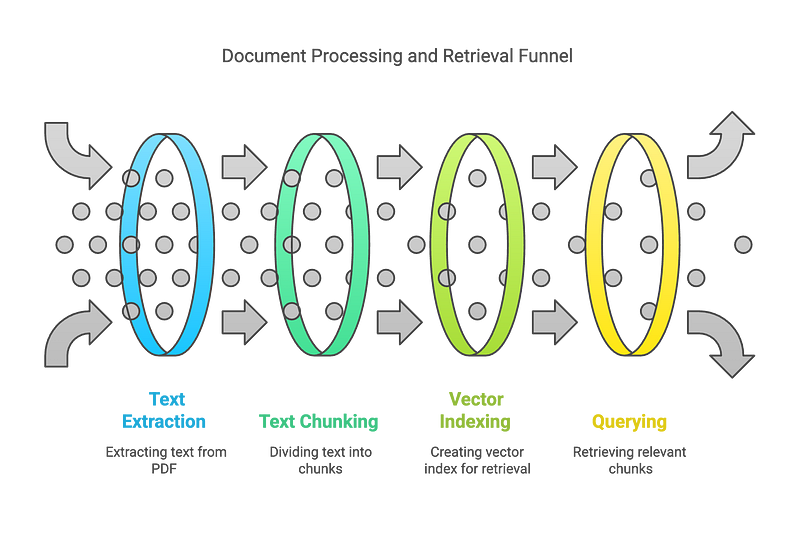
This code implements a basic Retrieval-Augmented Generation (RAG) system for processing and querying PDF document(s). The system uses a pipeline that encodes the documents and creates nodes. These nodes then can be used to build a vector index to retrieve relevant information.
Key Components
PDF processing and text extraction
Text chunking for manageable processing
Ingestion pipeline creation using FAISS as vector store and OpenAI embeddings
Retriever setup for querying the processed documents
Evaluation of the RAG system
Method Details
Document Preprocessing
The PDF is loaded using SimpleDirectoryReader.
The text is split into nodes/chunks using SentenceSplitter with specified chunk size and overlap.
Text Cleaning
A custom transformation TextCleaner is applied to clean the texts. This likely addresses specific formatting issues in the PDF.
Ingestion Pipeline Creation
OpenAI embeddings are used to create vector representations of the text nodes.
A FAISS vector store is created from these embeddings for efficient similarity search.
Retriever Setup
A retriever is configured to fetch the top 2 most relevant chunks for a given query.
Key Features
Modular Design: The ingestion process is encapsulated in a single function for easy reuse.
Configurable Chunking: Allows adjustment of chunk size and overlap.
Efficient Retrieval: Uses FAISS for fast similarity search.
Evaluation: Includes a function to evaluate the RAG system’s performance.
Usage Example
The code includes a test query: “What is the main cause of climate change?”. This demonstrates how to use the retriever to fetch relevant context from the processed document.
Evaluation
The system includes an evaluate_rag function to assess the performance of the retriever, though the specific metrics used are not detailed in the provided code.
Code
Import libraries and environment variables
from typing import List
from llama_index.core import SimpleDirectoryReader, VectorStoreIndex
from llama_index.core.ingestion import IngestionPipeline
from llama_index.core.schema import BaseNode, TransformComponent
from llama_index.vector_stores.faiss import FaissVectorStore
from llama_index.core.text_splitter import SentenceSplitter
from llama_index.embeddings.groq import GroqEmbedding
from llama_index.core import Settings
import faiss
import os
import sys
from dotenv import load_dotenv

sys.path.append(os.path.abspath(os.path.join(os.getcwd(), '..')))  # Add the parent directory to the path since we work with notebooks

# Define embedding dimensions
EMBED_DIMENSION = 512

# Chunk settings are different compared to LangChain examples
# Because for the chunk length, LangChain uses the length of the string,
# while LlamaIndex uses the length of the tokens
CHUNK_SIZE = 200
CHUNK_OVERLAP = 50

# Load environment variables from a .env file
load_dotenv()

# Set the Groq API key environment variable
if not os.getenv('GROQ_API_KEY'):
    os.environ["GROQ_API_KEY"] = input("Please enter your Groq API key: ")
else:
    os.environ["GROQ_API_KEY"] = os.getenv('GROQ_API_KEY')

# Use GroqEmbedding for embeddings
Settings.embed_model = GroqEmbedding(
    api_key=os.environ["GROQ_API_KEY"],  # Use the Groq API key
    model_name="groq-embedding-model",  # Replace with the actual Groq embedding model name
    dimensions=EMBED_DIMENSION
)

print("LlamaIndex is now using the Groq embedding model.")
Read Docs
path = "../data/"
node_parser = SimpleDirectoryReader(input_dir=path, required_exts=['.pdf'])
documents = node_parser.load_data()
print(documents[0])
Vector Store
# Create FaisVectorStore to store embeddings
faiss_index = faiss.IndexFlatL2(EMBED_DIMENSION)
vector_store = FaissVectorStore(faiss_index=faiss_index)
Text Cleaner Transformation
class TextCleaner(TransformComponent):
    """
    Transformation to be used within the ingestion pipeline.
    Cleans clutters from texts.
    """
    def __call__(self, nodes, **kwargs) -> List[BaseNode]:

        for node in nodes:
            node.text = node.text.replace('\t', ' ') # Replace tabs with spaces
            node.text = node.text.replace(' \n', ' ') # Replace paragraph seperator with spacaes

        return nodes
Ingestion Pipeline
text_splitter = SentenceSplitter(chunk_size=CHUNK_SIZE, chunk_overlap=CHUNK_OVERLAP)

# Create a pipeline with defined document transformations and vectorstore
pipeline = IngestionPipeline(
    transformations=[
        TextCleaner(),
        text_splitter,
    ],
    vector_store=vector_store,
)
# Run pipeline and get generated nodes from the process
nodes = pipeline.run(documents=documents)Create retriever
vector_store_index = VectorStoreIndex(nodes)
retriever = vector_store_index.as_retriever(similarity_top_k=2)
Test retriever
def show_context(context):
    """
    Display the contents of the provided context list.

    Args:
        context (list): A list of context items to be displayed.

    Prints each context item in the list with a heading indicating its position.
    """
    for i, c in enumerate(context):
        print(f"Context {i+1}:")
        print(c.text)
        print("\n
test_query = "What is the main cause of climate change?"
context = retriever.retrieve(test_query)
show_context(context)Let’s see how well does it perform:
import json
from deepeval import evaluate
from deepeval.metrics import GEval, FaithfulnessMetric, ContextualRelevancyMetric
from deepeval.test_case import LLMTestCaseParams
from evaluation.evalute_rag import create_deep_eval_test_cases

# Set llm model for evaluation of the question and answers
LLM_MODEL = "gpt-4o"

# Define evaluation metrics
correctness_metric = GEval(
    name="Correctness",
    model=LLM_MODEL,
    evaluation_params=[
        LLMTestCaseParams.EXPECTED_OUTPUT,
        LLMTestCaseParams.ACTUAL_OUTPUT
    ],
    evaluation_steps=[
        "Determine whether the actual output is factually correct based on the expected output."
    ],
)

faithfulness_metric = FaithfulnessMetric(
    threshold=0.7,
    model=LLM_MODEL,
    include_reason=False
)

relevance_metric = ContextualRelevancyMetric(
    threshold=1,
    model=LLM_MODEL,
    include_reason=True
)

def evaluate_rag(query_engine, num_questions: int = 5) -> None:
    """
    Evaluate the RAG system using predefined metrics.

    Args:
        query_engine: Query engine to ask questions and get answers along with retrieved context.
        num_questions (int): Number of questions to evaluate (default: 5).
    """


    # Load questions and answers from JSON file
    q_a_file_name = "../data/q_a.json"
    with open(q_a_file_name, "r", encoding="utf-8") as json_file:
        q_a = json.load(json_file)

    questions = [qa["question"] for qa in q_a][:num_questions]
    ground_truth_answers = [qa["answer"] for qa in q_a][:num_questions]
    generated_answers = []
    retrieved_documents = []

    # Generate answers and retrieve documents for each question
    for question in questions:
        response = query_engine.query(question)
        context = [doc.text for doc in response.source_nodes]
        retrieved_documents.append(context)
        generated_answers.append(response.response)

    # Create test cases and evaluate
    test_cases = create_deep_eval_test_cases(questions, ground_truth_answers, generated_answers, retrieved_documents)
    evaluate(
        test_cases=test_cases,
        metrics=[correctness_metric, faithfulness_metric, relevance_metric]
    )
Evaluate results
query_engine  = vector_store_index.as_query_engine(similarity_top_k=2)
evaluate_rag(query_engine, num_questions=1)
Want to upskill yourself in Gen AI and be a part of the Gen AI workforce? Explore today with our Industry Reality Check Interview:
Get a personalized roadmap to success with our AI-powered interview assessment. Your first step towards transforming your future starts here.👉 999 with 100% off at 0 INR — here — https://app.hidevs.xyz/industry-reality-check-interview
Benefits of this Approach
Scalability: Can handle large documents by processing them in chunks.
Flexibility: Easy to adjust parameters like chunk size and number of retrieved results.
Efficiency: Utilizes FAISS for fast similarity search in high-dimensional spaces.
Integration with Advanced NLP: Uses OpenAI embeddings for state-of-the-art text representation.
Conclusion
This simple RAG system provides a solid foundation for building more complex information retrieval and question-answering systems. By encoding document content into a searchable vector store, it enables efficient retrieval of relevant information in response to queries. This approach is particularly useful for applications requiring quick access to specific information within large documents or document collections.
Learn and Grow with Hidevs:
• Stay Updated: Dive into expert tutorials and insights on our YouTube Channel.
• Explore Solutions: Discover innovative AI tools and resources at www.hidevs.xyz.
• Join the Community: Connect with us on LinkedIn, Discord, and our WhatsApp Group.
Innovating the future, one breakthrough at a time.